InstaDoodle Review (2026): Fast Text-to-Doodle for Course Creators
A practical look at what InstaDoodle does well, where it falls short, and whether the $27 Black Friday promo is worth it for a solo course creator.
A narrow tool built around one job
InstaDoodle is not trying to be a full animation studio. It is built to turn a script or an idea into a doodle-style explainer without asking you to learn a timeline editor first.
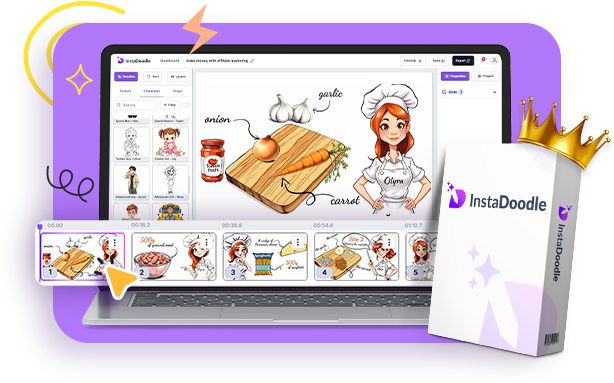
The workflow is straightforward: paste your script or prompt, choose a scene style and character, generate the doodle elements, adjust timing and voiceover, then export. That is a shorter path than building every scene by hand, which is why it appeals to teachers and solo course creators who need a usable first cut quickly.
The trade-off is control. You are working inside the vendor’s scene system, asset library, and export rules. That is fine when the goal is a clear 3–8 minute lesson video. It becomes a limitation when you need a formal brand system, custom character rigging, or cinematic scene construction.
Where InstaDoodle earns its place
Speed to a first cut
The biggest bottleneck for a course creator is usually the script and the first usable version, not the final polish. InstaDoodle shortens that loop because it starts from text and assembles scenes for you.
A recognizable visual style
The doodle look is consistent and easy to recognize. For lesson intros, concept explainers, and social clips, that can be enough. You do not need to art-direct every frame to get a coherent result.
A low entry price during the promo
The current Black Friday page presents a $27 one-time payment. For a solo creator testing a workflow, that is a much smaller commitment than a $99/month team plan.
Enough control for a lesson video
You can adjust timing, voiceover, scene order, and the generated elements. That is more than a pure template tool, but less than a manual animation editor. For a short explainer, it is a workable middle ground.
A refund window long enough to test
The sales page states a 60-day money-back guarantee. That gives you time to finish one real lesson and judge the output instead of guessing from a demo. Confirm the process at checkout.
The claims above describe the vendor’s public positioning. We did not purchase every plan or run a 30-day hands-on test for this review.
Four limits to check before you buy
1. Not a full animation studio
There is no advanced rigging, cinematic camera work, or deep character customization. If your course needs those, this is the wrong tool.
2. Promo pricing is volatile
The $27 price is a limited-time Black Friday offer. The normal price shown on the page is higher. Do not build a long-term budget around a promo that may end.
3. Licence and export limits
Confirm commercial use, resolution, aspect ratios, watermark policy, and any monthly export cap. A cheap tool with no clean export is not a deal.
4. Template feel
The output can look like the vendor’s house style. That is fine for a lesson, but it will not replace a custom brand visual system.
5. Refund terms are vendor-stated
A 60-day guarantee on a marketing page is not the same as a written checkout term. Read the actual refund process before you rely on it.
6. Not a Doodly replacement
If you specifically want the classic hand-drawn whiteboard look and manual scene building, Doodly is the closer fit.
What the $27 offer actually means
| Item | What the sales page states | What to confirm at checkout |
|---|---|---|
| Promo price | $27 one-time Black Friday offer | Final amount, currency, and whether the promo includes every feature |
| Normal price | $117 shown on the same page | Whether the higher price applies after the promo ends |
| Refund | 60-day money-back guarantee, vendor-stated | Deadline, process, exclusions, and who to contact |
| Licence | Commercial use is not automatic from the headline | Paid course, YouTube, ads, and client work rights |
| Exports | Not fully specified on the headline | Resolution, watermark, aspect ratios, and any monthly cap |
Practical rule: finish one real lesson inside the refund window. If the output is not good enough for your course, refund it instead of hoping a future update fixes the workflow.
Check the current InstaDoodle price
Affiliate link. Price and guarantee are vendor-stated; confirm at checkout.
InstaDoodle vs Doodly, in one minute
| Decision factor | InstaDoodle | Doodly |
|---|---|---|
| First cut speed | Fast — starts from text or prompt | Slower — manual scene building |
| Visual control | Moderate; vendor scene system | High — classic whiteboard control |
| Current pricing | $27 one-time promo | From $49/month; subscription |
| Refund | 60 days, vendor-stated | 30 days, vendor-stated |
| Best fit | Solo creator who needs a fast lesson video | Creator who wants the classic look and manual control |
Read the full comparison: InstaDoodle vs Doodly.
Buy it if you need speed, skip it if you need control
Solo course creators
You need a clear 3–8 minute lesson video, you have a script, and you do not want to learn a full animation suite.
Teachers and tutors
You make lesson intros, concept explainers, and short social clips, and you want a consistent doodle style without hiring an editor.
You need a brand system
You already use Vyond, need custom characters, or produce long-form animated lessons with frame-level control.
See the current InstaDoodle offer
Check the live price, promo deadline, and refund terms before you decide.
Common questions
Is InstaDoodle good for course creators?
Yes, if you want a fast doodle-style lesson video without learning a full animation suite. It is weaker for teams that need brand controls, custom rigging, or frame-by-frame animation.
Is InstaDoodle really $27?
The current sales page presents a $27 one-time Black Friday promo. The page also shows a higher normal price. Promo pricing and inclusions can change, so confirm the amount and terms at checkout.
Does InstaDoodle have a refund policy?
The sales page states a 60-day money-back guarantee. Treat that as vendor-stated and confirm the exact process, deadline, and exclusions in the checkout terms before buying.
Can I use InstaDoodle videos in a paid course?
Commercial use depends on the licence terms at checkout. Do not assume that a marketing page grants commercial rights. Confirm that paid course, YouTube, and ad usage are allowed before building a product around it.
InstaDoodle vs Doodly: which is faster?
InstaDoodle is faster for a first cut because it starts from a script or prompt. Doodly gives more manual control but requires you to build scenes and timing yourself.