Best AI Whiteboard Animation Software for Course Creators (2026)
You do not need an animation studio to make a clear lesson video. You need a tool that turns your script into a usable whiteboard explainer without a 20-hour learning curve.
Transparency. We checked vendor pricing and refund pages on November 23, 2026. We did not purchase every tool or run a 30-day hands-on test for this page. Where a claim is vendor-stated, we say so. Prices and terms change; the checkout page is the source of truth.
Pick the tool that gets one real lesson finished.
Most course creators do not need the most powerful animation platform. They need a clear 3–8 minute lesson video, a predictable export, and a refund window long enough to test the workflow.
InstaDoodle
The shortest text-to-doodle path in this comparison, with a $27 Black Friday promo and a vendor-stated 60-day money-back guarantee.
- Short path from script to first cut
- Lower upfront cost than a year of team software
- 60-day refund window, per the sales page
Vyond
Stronger collaboration and brand controls. More platform than a solo creator usually needs.
Or $699/year. 14-day free trial; trial exports carry a watermark.
Best low upfront cost
InstaDoodle — the $27 one-time Black Friday promo is the lowest entry point here, but it is a limited-time price.
Best classic whiteboard control
Doodly — classic hand-drawn look and manual scene building. The current main offer is a subscription, not the old one-time licence.
Best template variety
Animaker — more styles in one platform, with a steeper learning curve and subscription pricing.
Three different ways to make a lesson video
The category is broader than “whiteboard software.” The right choice depends on how much control you want and how fast you need the first usable cut.
AI text-to-doodle
You provide a script or prompt; the tool assembles doodle scenes. Fastest first cut, less granular control. This is where InstaDoodle sits.
Desktop whiteboard canvas
You build scenes by hand from a large asset library. More control, more time. This is Doodly’s core workflow.
All-in-one animation
Whiteboard, cartoon, infographic, and other styles in one subscription. More range, steeper learning curve. Think Vyond and Animaker.
For a paid course, the bottleneck is usually the script and the first usable cut — not the animation polish. That is why the fastest workflow can beat the most feature-rich platform for a solo creator.
Comparison table
A practical view for course creators. Prices are USD, before tax, and were checked on November 23, 2026. Confirm them on the vendor’s checkout page.
| Tool | Best for | Starting price (USD) | AI workflow | Whiteboard style | Refund |
|---|---|---|---|---|---|
| InstaDoodle | Solo course creators and teachers | $27 one-time Black Friday promo | Text prompt to doodle scene | Doodle / whiteboard | 60 days, vendor-stated |
| Vyond | Teams with brand guidelines | $99/mo; $699/year | AI-assisted, template-led | Polished cartoon + whiteboard | No general refund |
| Doodly | Classic whiteboard, manual control | $49/mo; $490/year | Limited / manual | Classic hand-drawn | 30 days |
| Animaker | Many visual styles | $45/mo; $25/mo billed annually | Template and AI-assisted | Whiteboard among many styles | Check terms |
Refund terms change. A marketing page saying “60 days” is not enough; confirm it in the checkout terms. Vyond’s terms say paid subscription fees are generally non-refundable; annual plans do not refund the current term.
What you are actually buying
These are official InstaDoodle product visuals from the vendor’s public sales page. They show the style and editor context — not our own hands-on export. Your script, assets, and timing determine the final video.
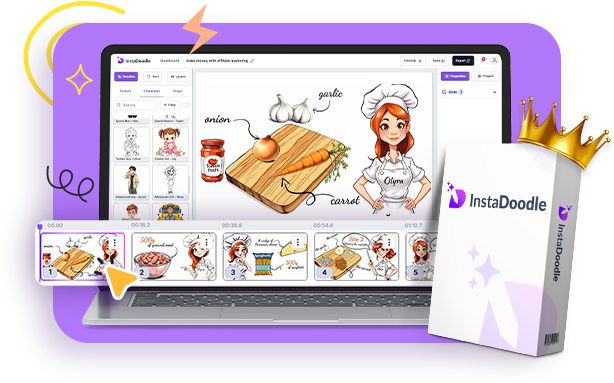
Why we are not showing a fake “workspace screenshot”: we have not purchased and tested every tool for this launch. A fabricated UI screenshot would be worse than an honest vendor visual. We will add our own screenshots after a paid test.
How we compared them
We scored the tools on six practical criteria, not on the length of their feature list.
| Criterion | What we looked for |
|---|---|
| Output quality | Can the finished video carry a paid course? |
| Learning curve | Can a new user publish a first video in one session? |
| AI workflow | Does AI reduce scripting, scene building, or voiceover time? |
| Export | MP4, resolution, aspect ratios, watermark policy |
| Price | One-time vs subscription; refund window |
| Support | Tutorials, templates, response time, refund process |
What we verified: public pricing pages, plan limits, refund claims, and trial terms for all four tools on November 23, 2026. What we did not do: buy every plan, export a sample from every tool, or claim a test period we did not complete. If a claim is vendor-stated, we label it that way.
Sources checked: Vyond Plans and FAQs; Doodly Pricing and homepage; Animaker Pricing; InstaDoodle public sales page. Last verified November 23, 2026.
1. InstaDoodle — best for solo course creators
Best for: course creators, teachers, and solo experts who want a whiteboard-style lesson video without learning a full animation suite.
Not for: teams that need shared brand kits, approval workflows, or advanced character rigging.
Why it fits course creators
$27 one-time Black Friday promo · 60-day guarantee, vendor-stated · text-to-doodle workflow
InstaDoodle is built around a narrow job: turn an idea into a doodle-style explainer without a timeline editor. For a course creator, that matters because the bottleneck is usually the script and the first usable cut, not the animation polish.
The workflow is: paste your script or prompt, choose a scene style and character, generate the doodle elements, adjust timing and voiceover, then export. That is a shorter path than building every scene by hand.
What works
- Fast first cut: text-to-doodle is the main reason to choose it.
- Lower upfront cost than a year of team software.
- 60-day refund window gives you time to finish one real lesson.
- Templates and pre-built elements reduce the blank-canvas problem.
Where it falls short
- Not a full animation studio: no advanced rigging or cinematic scenes.
- Promo pricing is volatile; do not build a budget around $27 forever.
- Style range is narrower: doodle/whiteboard is the core.
- Teams will outgrow it; shared brand controls are not the priority.
Check before you buy: commercial use rights, export limits, whether the $27 promo includes every feature, and the exact refund process. The sales page states the 60-day guarantee; confirm the terms at checkout. The promo is a limited-time Black Friday offer, so the price may revert.
Who should skip it: you already have a Vyond team workspace, need a formal brand system, or produce long-form animated lessons with custom characters. Also skip it if you cannot test the tool before the refund window closes.
Affiliate link. Price and 60-day guarantee are vendor-stated; confirm at checkout.
2–4. Vyond, Doodly, and Animaker
Vyond — best for teams with brand guidelines
From $99/mo · 14-day free trial · collaboration and brand controls
Vyond is the safe corporate choice: predictable output, a large template library, and collaboration features. The trade-off is cost and complexity. If you are one person building a course, you will pay for seats and governance you do not use.
2026 price check: Starter is $99/month or $699 billed annually; Professional is $199/month or $1,199 billed annually. Enterprise and Agency plans are annual-only. The 14-day free trial is useful, but trial exports carry a watermark; plan trials in select regions are non-refundable.
Refund: Vyond’s terms say paid subscription fees are generally non-refundable, and annual plans do not refund the current term. Treat it as a commitment, not a try-before-you-buy tool.
Verdict: choose Vyond when a team needs a shared visual system. Do not choose it for a first solo course.
Doodly — best classic whiteboard control
From $49/mo · 14-day trial · 30-day money-back guarantee
Doodly is a mature whiteboard option with a recognizable hand-drawn style. The appeal is the look and the manual control. The cost is time: you build scenes, set timing, and manage assets yourself.
Important 2026 correction: many older reviews call Doodly a one-time licence. That is out of date for the main offer. Doodly now sells through Voomly Cloud as a monthly or annual subscription: Standard is $49/month or $490/year, Enterprise is $79/month or $790/year. The Doodly Marketplace still sells one-time asset packs, but software access is subscription-based.
Refund: Doodly states a 30-day money-back guarantee on its site. Confirm the terms at checkout.
Verdict: a good fit if you want the classic whiteboard look and enjoy the manual process. A poor fit if your priority is speed or a true one-time software purchase.
Animaker — best template variety
From $25/mo annual · many visual styles · subscription
Animaker gives you more styles in one place. That is useful if your course needs visual variety. It also means more options, more settings, and more time before the first export.
2026 price check: Starter is $45/month or $25/month billed annually ($300/year); Pro is $79/month or $43/month billed annually ($516/year). Paid plans remove the Animaker watermark; check the export limits for your plan.
Refund: we did not find a clear, current money-back guarantee on the official pricing page. Check the checkout terms before an annual commitment.
Verdict: choose Animaker when variety matters more than speed. Do not choose it for your first whiteboard video if you want a one-session workflow.
Which one should you pick?
| Your situation | Start with |
|---|---|
| Solo creator, first course, tight budget | InstaDoodle |
| Teacher making lesson intros and explainers | InstaDoodle |
| Team with brand guidelines and review process | Vyond |
| You want a classic whiteboard look and manual control | Doodly |
| You need many visual styles in one subscription | Animaker |
The mistake most course creators make is buying an annual team plan before validating the script. Pick the tool that gets one real lesson video finished. Then decide whether you need more control.
Pricing and guarantee: check five things
1. What is included
Credits, exports, commercial rights, templates. A low price with no export rights is not a deal.
2. One-time or recurring
A promo page can change from a one-time offer to a subscription. Read the checkout terms, not just the headline.
3. Refund window
“60 days” or “30 days” should be in the checkout terms, not only in marketing copy.
4. Commercial use rights
Can you use the video in a paid course, YouTube, and ads? If the page will not answer that, do not buy.
5. Export limits
Resolution, monthly downloads, watermark, and aspect ratios. A lesson video that cannot export cleanly is not finished.
Common questions
Is InstaDoodle good for course creators?
Yes, if you want a fast whiteboard-style lesson video without learning a full animation suite. It is less suitable for teams that need brand controls and advanced animation.
Is InstaDoodle a one-time payment?
The current Black Friday promo is presented as a $27 one-time payment. Promo pricing and inclusions can change, so confirm the checkout terms before buying.
Can I use the videos in a paid course?
Check the licence terms at checkout. Do not assume commercial rights from a marketing page. For InstaDoodle, confirm commercial use before building a paid course around it.
Do I need design experience?
No for the basic workflow. You still need a clear script, a reason for each scene, and a final pass on timing and voiceover.
Is Doodly still a one-time payment?
Older reviews describe Doodly as a one-time licence. The current main offer is a Voomly Cloud subscription, with monthly or annual billing. Doodly Marketplace asset packs are separate one-time purchases.
What is the cheapest option?
Compare the total cost of one finished video, not the sticker price. InstaDoodle’s $27 promo is the lowest entry point here, but it is limited-time. A subscription with 20 hours of manual work can cost more than a promo plus two hours.
Can I get a refund?
InstaDoodle’s sales page states a 60-day money-back guarantee. Doodly states a 30-day money-back guarantee. Vyond’s paid subscription fees are generally non-refundable under its terms. Check the checkout terms for every vendor.
Start with one lesson, not a full studio.
For most solo course creators, InstaDoodle is the best first tool: lower upfront cost, a shorter path from script to video, and a refund window long enough to finish one real lesson.
Choose Vyond if you are buying for a team. Choose Doodly if you want the classic whiteboard look and manual control. Choose Animaker if you need many styles in one subscription.
Try InstaDoodle on one real lesson
Current Black Friday promo is $27 one-time. The sales page states a 60-day money-back guarantee. Confirm both at checkout.
Affiliate link. Price and refund terms are vendor-stated and can change; the checkout page is the source of truth.
Who wrote this — and how we make money
Course Video Lab Editorial Team
Course Video Lab is an editorial section published on lab.chmib.com. We are an independent affiliate publication focused on practical tools for course creators and teachers. We are not InstaDoodle employees, and no vendor paid for placement on this page.
How we make money
Some links are affiliate links. If you buy through them, we may earn a commission at no extra cost to you. Commission size does not decide the ranking; workflow fit and total cost do.
Methodology
We compare vendor-published pricing, plan limits, refund terms, public demos, and documented workflows. We do not invent hands-on test periods or fake screenshots. Prices were checked on November 23, 2026.
Privacy
This page does not collect email addresses or account data. If you click an affiliate link, the vendor’s site and privacy policy apply. We do not sell reader data.
All product names and trademarks belong to their owners. This page is editorial content, not legal, tax, or financial advice.